iOS/설명
[iOS] IBOutlet Collections
Sky Titan
2022. 8. 1. 21:21
728x90
https://stackoverflow.com/questions/24805180/swift-put-multiple-iboutlets-in-an-array
Swift put multiple IBOutlets in an Array
I made these (marked with red border) IBOutlets using ctrl + drag But i don't like to have the exact same line 9 times (DRY) How do i put these IBOutlets in an Array?
stackoverflow.com
IBOutlet Collections
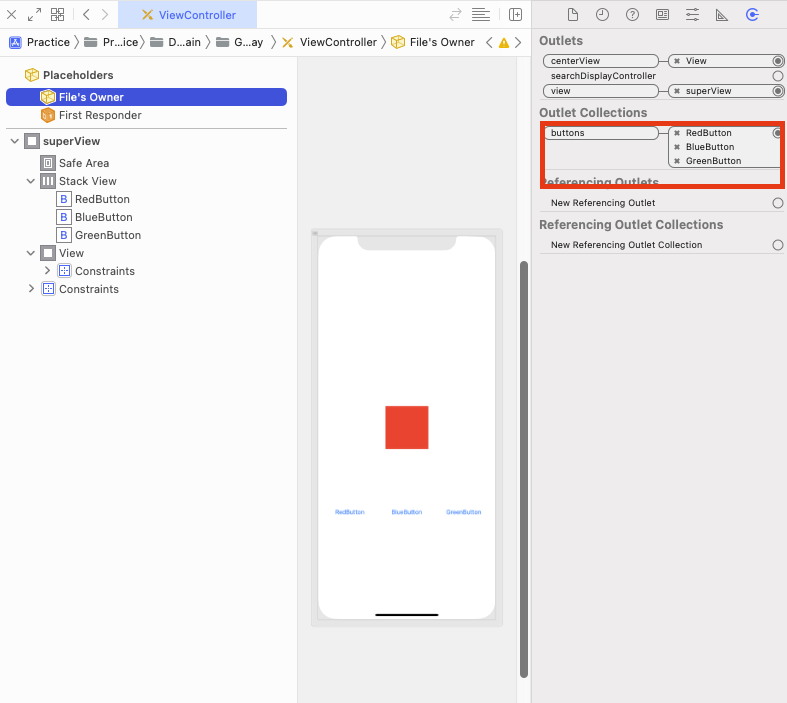
- 간단히 말하자면 같은 타입의 여러 개의 IBOutlet property들을 하나의 배열로 만들어 놓은 것이라고 보면 된다.
- ex) @IBOutlet var buttons: [UIButton]!
- 여러 개의 동일한 타입의 객체들이 xib에서 여러 개가 있을 때, 중복을 줄이고 재사용성을 높일 수 있는 방법이다.
사용 예시
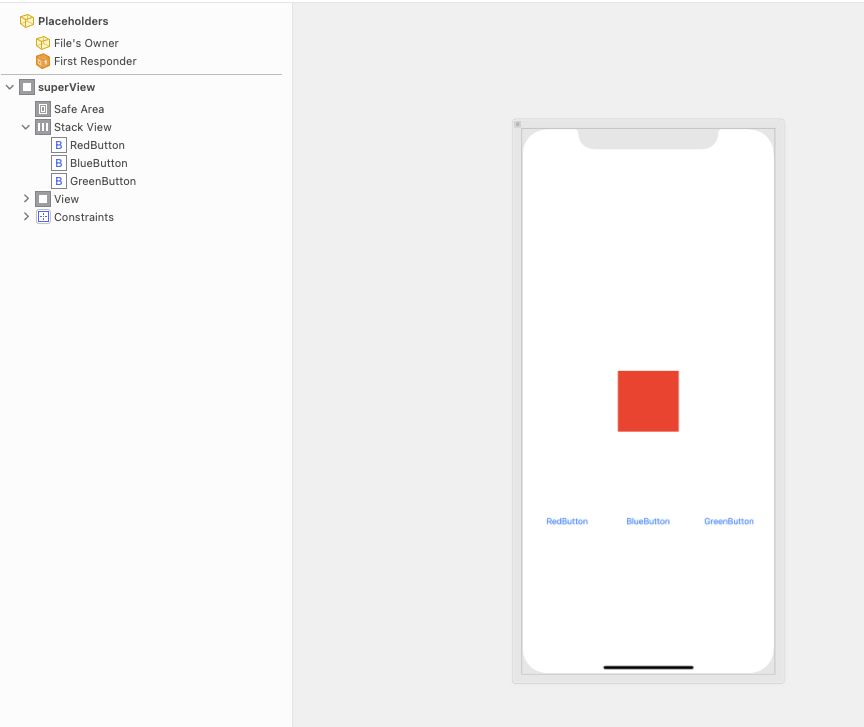
이런 식으로 각각의 버튼이 중앙에 있는 정사각형 UIView의 배경색을 바꾸는 역할을 한다고 가정해보겠다.
1. Collection을 쓰지 않는 경우
import UIKit

class ViewController: UIViewController {

    @IBOutlet weak var redButton: UIButton!
    @IBOutlet weak var blueButton: UIButton!
    @IBOutlet weak var greenButton: UIButton!
    @IBOutlet weak var centerView: UIView!

    let colors: [UIColor] = [.red, .blue, .green]
    override func viewDidLoad() {
        super.viewDidLoad()
        redButton.addTarget(self, action: #selector(colorButtonClicked(_:)), for: .touchUpInside)
        blueButton.addTarget(self, action: #selector(colorButtonClicked(_:)), for: .touchUpInside)
        greenButton.addTarget(self, action: #selector(colorButtonClicked(_:)), for: .touchUpInside)
        redButton.tag = 0
        blueButton.tag = 1
        greenButton.tag = 2
    }

    @objc
    func colorButtonClicked(_ sender: UIButton) {
        let index = sender.tag
        centerView.backgroundColor = colors[index]
    }
}
만약 collection을 사용하지 않는다면 최소 3개의 IBOutlet button 프로퍼티와 각각의 Button들에 target-action 메커니즘을 적용하는 코드들이 필요하다.
2. Collection을 쓴 경우
import UIKit

class ViewController: UIViewController {

    @IBOutlet var buttons: [UIButton]!
    @IBOutlet weak var centerView: UIView!

    let colors: [UIColor] = [.red, .blue, .green]
    override func viewDidLoad() {
        super.viewDidLoad()
        for index in 0 ..< buttons.count {
            buttons[index].addTarget(self, action: #selector(colorButtonClicked(_:)), for: .touchUpInside)
            buttons[index].tag = index
        }
    }

    @objc
    func colorButtonClicked(_ sender: UIButton) {
        let index = sender.tag
        centerView.backgroundColor = colors[index]
    }
}
다음과 같이 Collection을 써서 하나의 배열로 사용한다면 불필요한 중복 코드들을 줄일 수 있다.
728x90